
集成案例
本文档页面为集成商提供万里汇支付系统的 Java 集成参考案例,内容涵盖沙箱环境测试和上线流程,帮助集成商实现快速集成。
沙箱环境集成
注意:为了确保您获得最佳的集成体验,请务必按照以下步骤完成沙箱环境的配置。
步骤一:获取集成信息
联系万里汇技术支持以获取下列信息:
- 集成商 client-id
- 万里汇测试环境域名
- 万里汇测试环境公钥
步骤二:生成 RSA 密钥对
生成集成商公钥及私钥,将集成商公钥提供给万里汇技术支持进行配置。
注意:JAVA 语言需生成 PKCS8 格式秘钥,详见生成签名及加验签。
步骤三:提供支付链接
下单成功后,集成商需要将支付链接 actionForm.redirectUrl 提供给万里汇技术支持,以绑定测试账号并用于支付。
步骤四:提供通知地址
完成支付后,万里汇向集成商通知本次支付结果。集成商需要将通知地址 paymentNotifyUrl 提供给万里汇技术支持加入白名单,即可使用沙箱环境进行测试。进入线上环境则无需加入白名单。
代码示例
1. 加验签工具示例
copy
/**
 * Alipay.com Inc. Copyright (c) 2004-2025 All Rights Reserved.
 */

import java.io.UnsupportedEncodingException;
import java.net.URLDecoder;
import java.net.URLEncoder;
import java.security.KeyFactory;
import java.security.PrivateKey;
import java.security.PublicKey;
import java.security.Signature;
import java.security.spec.PKCS8EncodedKeySpec;
import java.security.spec.X509EncodedKeySpec;
import java.time.OffsetDateTime;
import java.time.ZoneOffset;
import java.time.format.DateTimeFormatter;
import java.util.Base64;

/**
 * 加验签工具,可直接使用
 */
public class SignAndVerifyTool {
    private static final String RSA             = "RSA";
    private static final String SHA256_WITH_RSA = "SHA256withRSA";
    private static final String DEFAULT_CHARSET = "UTF-8";

    /**
     * sign with request
     * @param httpMethod http method
     * @param uri    your webhook endpoint, domain part excluded, sample: /amsin/api/v1/business/create
     * @param clientId your clientId
     * @param reqTimeStr
     * @param reqBody
     * @param merchantPrivateKey
     * @return
     * @throws Exception
     */
    public static String sign(String httpMethod, String uri, String clientId, String reqTimeStr,
                              String reqBody, String merchantPrivateKey) throws Exception {
        String reqContent = genSignContent(httpMethod, uri, clientId, reqTimeStr, reqBody);
        return encode(signWithSHA256RSA(reqContent, merchantPrivateKey), DEFAULT_CHARSET);
    }

    /**
     * verify webhook signature
     *
     * @param requestUri      your webhook endpoint, domain part excluded, sample: /payNotify
     * @param httpMethod      http method
     * @param clientId        your clientId, sample: 5J5YEX4XXXXXXX
     * @param requestTime     requestTime from http header, sample: 2025-08-04T01:01:01Z
     * @param signature       signature from http header, sample: algorithm=RSA256,keyVersion=1,signature=xxx
     * @param notifyBody      notify body
     * @param alipayPublicKey alipay public key
     *
     * @return
     * @throws Exception
     */
    public static boolean checkSignature(String requestUri, String httpMethod, String clientId,
                                         String requestTime, String signature, String notifyBody,
                                         String alipayPublicKey) throws Exception {
        String realSignature = "";

        // get valid part from raw signature
        if (signature == null || signature.isEmpty()) {
            throw new RuntimeException("empty notify signature");
        } else {
            String[] parts = signature.split("signature=");
            if (parts.length > 1) {
                realSignature = parts[1];
            }
        }

        try {
            // verify signature
            return verify(httpMethod, requestUri, clientId, requestTime, notifyBody, realSignature,
                          alipayPublicKey);
        } catch (Exception e) {
            throw new Exception(e);
        }

    }

    /**
     * URL  encode
     * @param originalStr
     * @param characterEncoding
     * @return
     * @throws UnsupportedEncodingException
     */
    private static String encode(String originalStr, String characterEncoding)
                                                                              throws UnsupportedEncodingException {
        return URLEncoder.encode(originalStr, characterEncoding);
    }

    /**
     * Generate base64 encoded signature using the sender's private key
     *
     * @param reqContent:    the original content to be signed by the sender
     * @param strPrivateKey: the private key which should be base64 encoded
     * @return
     * @throws Exception
     */
    private static String signWithSHA256RSA(String reqContent, String strPrivateKey)
                                                                                    throws Exception {
        Signature privateSignature = Signature.getInstance(SHA256_WITH_RSA);
        privateSignature.initSign(getPrivateKeyFromBase64String(strPrivateKey));
        privateSignature.update(reqContent.getBytes(DEFAULT_CHARSET));
        byte[] bytes = privateSignature.sign();

        return Base64.getEncoder().encodeToString(bytes);
    }

    /**
     *
     * @param privateKeyString
     * @return
     * @throws Exception
     */
    private static PrivateKey getPrivateKeyFromBase64String(String privateKeyString)
                                                                                    throws Exception {
        byte[] b1 = Base64.getDecoder().decode(privateKeyString);
        PKCS8EncodedKeySpec spec = new PKCS8EncodedKeySpec(b1);
        KeyFactory kf = KeyFactory.getInstance(RSA);
        return kf.generatePrivate(spec);
    }

    public static boolean verify(String httpMethod, String path, String clientId,
                                 String rspTimeStr, String rspBody, String signature,
                                 String alipayPublicKey) throws Exception {
        String rspContent = genSignContent(httpMethod, path, clientId, rspTimeStr, rspBody);
        return verifySignatureWithSHA256RSA(rspContent, decode(signature, DEFAULT_CHARSET),
            alipayPublicKey);
    }

    public static String genSignContent(String httpMethod, String path, String clientId,
                                        String timeString, String content) {
        String payload = httpMethod + " " + path + "\n" + clientId + "." + timeString + "."
                         + content;

        return payload;
    }

    /**
     * Verify if the received signature is correctly generated with the sender's public key
     *
     * @param rspContent: the original content signed by the sender and to be verified by the receiver.
     * @param signature:  the signature generated by the sender
     * @param strPk:      the public key string-base64 encoded
     * @return
     * @throws Exception
     */
    private static boolean verifySignatureWithSHA256RSA(String rspContent, String signature,
                                                        String strPk) throws Exception {
        PublicKey publicKey = getPublicKeyFromBase64String(strPk);

        Signature publicSignature = Signature.getInstance(SHA256_WITH_RSA);
        publicSignature.initVerify(publicKey);
        publicSignature.update(rspContent.getBytes(DEFAULT_CHARSET));

        byte[] signatureBytes = Base64.getDecoder().decode(signature);
        return publicSignature.verify(signatureBytes);

    }

    /**
     *
     * @param publicKeyString
     * @return
     */
    private static PublicKey getPublicKeyFromBase64String(String publicKeyString) throws Exception {
        byte[] b1 = Base64.getDecoder().decode(publicKeyString);
        X509EncodedKeySpec X509publicKey = new X509EncodedKeySpec(b1);
        KeyFactory kf = KeyFactory.getInstance(RSA);
        return kf.generatePublic(X509publicKey);
    }

    /**
     * 获取当前时间的规范模式 JDK 1.8
     * ISO 8601标准时间
     */
    public static String getRequestTimeWithISO8601() {
        OffsetDateTime dateTime = OffsetDateTime.now(ZoneOffset.ofHours(8));
        DateTimeFormatter formatter = DateTimeFormatter.ofPattern("yyyy-MM-dd'T'HH:mm:ssXXX");
        return dateTime.format(formatter);
    }

    /**
     * URL decode
     * @param originalStr
     * @param characterEncoding
     * @return
     * @throws UnsupportedEncodingException
     */
    private static String decode(String originalStr, String characterEncoding)
                                                                              throws UnsupportedEncodingException {
        return URLDecoder.decode(originalStr, characterEncoding);
    }
}
2. 下单步骤示例
copy
/**
 * Alipay.com Inc. Copyright (c) 2004-2025 All Rights Reserved.
 */

import java.io.BufferedReader;
import java.io.BufferedWriter;
import java.io.IOException;
import java.io.InputStreamReader;
import java.io.OutputStream;
import java.io.OutputStreamWriter;
import java.net.HttpURLConnection;
import java.net.URL;
import java.nio.charset.StandardCharsets;
import java.util.Arrays;
import java.util.HashMap;
import java.util.Map;

import com.alibaba.fastjson.JSONObject;

import com.google.gson.Gson;

/**
 * 示例代码
 */
public class CheckOutPayTest {

    /**
     * name and value separator
     */
    private static final String NAME_VALUE_SEPARATOR = "=";

    /**
     * comma
     */
    private static final String COMMA                = ",";

    /**
     * algorithm
     */
    private static final String ALGORITHM            = "algorithm";

    /**
     * signature
     */
    private static final String SIGNATURE            = "signature";

    /**
     * keyVersion
     */
    private static final String KEY_VERSION          = "keyVersion";

    /**
     * RSA256
     */
    private static final String RSA_256              = "RSA256";

    //商户  私钥
    private static final String merchantPrivateKey   = "MII********************ukzv";

    //ipay 公钥
    private static final String alipayPublicKey      = "MII*****AQAB";


    public static void main(String[] args) throws Exception {

        //创单及验签
        createOrderAndVerify();

        //支付结果通知验签
       // verifyWorldFirstNotify();
    }

    /**
     * 创建万里汇订单并验签
     * @throws Exception
     */
    public static void createOrderAndVerify() throws Exception {

        //测试环境域名
        String domain = "https://open-sitprod-qk.alipay.com";

        //POST请求
        String httpMethod = "POST";

        //创单uri
        String urlEndPoint = "/amsin/api/v1/business/create";

        //集成商client-Id,万里汇提供
        String clientId = "5J5*******540";

        //ISO 8601标准 请求时间
        String requestTime = SignAndVerifyTool.getRequestTimeWithISO8601();

        //参考下单API创建订单
        WorldFirstOrder worldFirstOrder = createWorldFirstOrder(requestTime);
        Gson gson = new Gson();

        //requestBody加签和发送请求时需一致,以便万里汇验签
        String requestBody = gson.toJson(worldFirstOrder);

        //请求数据加签
        String signature = SignAndVerifyTool.sign(httpMethod, urlEndPoint, clientId, requestTime,
            requestBody, merchantPrivateKey);

        //构建签名信息
        String signatureHeaderPayload = buildSignatureHeaderPayload(signature);

        //构建请求头
        Map<String, String> headers = buildHeaders(clientId, requestTime, signatureHeaderPayload);

        //构建请求url
        String url = domain + urlEndPoint;

        //发送创单请求
        Map<String, String> response = sendPost(url, requestBody, headers);

        //响应签名 来源headers.signature
        String responseSignature = response.get("signature");

        //响应时间 来源headers.response-time
        String responseTime = response.get("responseTime");

        //响应结果,原始报文
        String responseResult = response.get("result");

        System.out.println(responseResult);

        //验签
        boolean checkResult = SignAndVerifyTool.checkSignature(urlEndPoint, httpMethod, clientId,
            responseTime, responseSignature, responseResult, alipayPublicKey);

        System.out.println("对万里汇创单验签结果:" + checkResult);

    }

    /**
     *
     * @param url request url。 sample: https://open-sitprod-qk.alipay.com/amsin/api/v1/business/create
     * @param param  requestBody
     * @param header http header
     * @return
     * @throws IOException
     */
    public static Map<String, String> sendPost(String url, String param, Map<String, String> header)
                                                                                                    throws IOException {
        URL realUrl = new URL(url);
        HttpURLConnection conn = (HttpURLConnection) realUrl.openConnection();
        conn.setConnectTimeout(5000);
        conn.setReadTimeout(15000);
        conn.setRequestMethod("POST");
        conn.setDoOutput(true);
        conn.setDoInput(true);
        conn.setRequestProperty("Content-Type", "application/json; charset=utf-8");
        if (header != null) {
            for (Map.Entry<String, String> entry : header.entrySet()) {
                conn.setRequestProperty(entry.getKey(), entry.getValue());
            }
        }
        conn.connect();
        try (OutputStream out = conn.getOutputStream();
                BufferedWriter writer = new BufferedWriter(new OutputStreamWriter(out,
                    StandardCharsets.UTF_8))) {
            writer.write(param);
            writer.flush();
        }
        Map<String, String> response = new HashMap<>();
        response.put("signature", conn.getHeaderField("signature"));
        response.put("responseTime", conn.getHeaderField("response-time"));
        try (BufferedReader reader = new BufferedReader(new InputStreamReader(
            conn.getInputStream(), StandardCharsets.UTF_8))) {
            StringBuilder sb = new StringBuilder();
            String line;
            while ((line = reader.readLine()) != null) {
                sb.append(line);
            }
            response.put("result", sb.toString());
        }
        return response;
    }

    /**
     * build http headers
     * @param clientId
     * @param time 和加签的请求时间一致
     * @param signatureHeaderPayload 签名信息
     * @return
     */
    public static Map<String, String> buildHeaders(String clientId, String time,
                                                   String signatureHeaderPayload) {
        Map<String, String> header = new HashMap<>();
        header.put("client-id", clientId);
        header.put("request-time", time); //响应通知使用 response-time 参考:https://developers.worldfirst.com.cn/docs/alipay-worldfirst/cashier_payment_zh/notify_payment
        header.put("signature", signatureHeaderPayload);
        return header;

    }

    /**
     *
     * @param signature
     * @return
     */
    public static String buildSignatureHeaderPayload(String signature) {
        return new StringBuilder(ALGORITHM).append(NAME_VALUE_SEPARATOR).append(RSA_256)
            .append(COMMA).append(KEY_VERSION).append(NAME_VALUE_SEPARATOR).append("1")
            .append(COMMA).append(SIGNATURE).append(NAME_VALUE_SEPARATOR).append(signature)
            .toString();

    }


    /**
     * 商户模拟接收万里汇支付结果通知的验签处理
     * 通知请求body:  {"notifyType":"PAYMENT_RESULT","payToAmount":{"currency":"USD","value":"5000"},***********"result":{"resultCode":"SUCCESS","resultMessage":"success.","resultStatus":"S"}}
     * 通知请求头headers:"headers":{"Content-Type":"application/json","client-id":"5J5*******0540","request-time":"2025-******8Z","signature":"algorithm=RSA256,keyVersion=1,signature=BTBbm7*********%3D%3D"
     */
    public static void verifyWorldFirstNotify() throws Exception {
        //请求方式
        String httpMethod = "POST";

        //集成商通知uri
        String urlEndPoint = "/api/xx/xxNotify";

        //集成商client-id
        String clientId = "5J5*******540";

        //商户通知时间 来源:headers.request-time
        String timeString = "request-time";

        //支付结果通知   来源:原始报文requestBody
        String requestBody = "requestBody";

        //请求签名   来源:headers.signature
        String signature = "signature";

        //对万里汇支付结果通知验签
        boolean verifyResult = SignAndVerifyTool.checkSignature(urlEndPoint, httpMethod, clientId,
            timeString, signature, requestBody, alipayPublicKey);

        System.out.println("验证支付结果通知:" + verifyResult);


        //在收到万里汇的支付结果后,集成商需要向万里汇发送响应信息,以确认信息已收到
        //模拟响应

        //响应body
        JSONObject successResponse = new JSONObject();
        JSONObject result = new JSONObject();
        result.put("resultStatus","S");
        result.put("resultCode","SUCCESS");
        result.put("resultMessage","success");
        successResponse.put("result",result);

        String responseBody = successResponse.toString();

        //ISO 8601标准 时间
        String responseTime = SignAndVerifyTool.getRequestTimeWithISO8601();

        //响应数据加签
        String responseSignature = SignAndVerifyTool.sign(httpMethod, urlEndPoint, clientId, responseTime,
                responseBody, merchantPrivateKey);

        //构建签名信息
        String signatureHeaderPayload = buildSignatureHeaderPayload(signature);

        //构建响应头
        Map<String, String> headers = buildHeaders(clientId, responseTime, signatureHeaderPayload);

        //成功响应


    }

}
报文示例
1. 下单
- 请求头
copy
"headers": {
    "client-id": "5J5YE*****00540",
    "content-type": "application/json; charset=utf-8",
    "request-time": "2025-11-19T16:04:18+08:00",
    "signature": "algorithm=RSA256,keyVersion=1,signature=vtZGnCziR75iXGvuRbi8o***********uUjuBrirG6m3SpIWYRHzKgfIog==",
    ***
    ***
}- 请求体
copy
{
  "orderGroup": {
    "orderGroupId": "orderGroupId",
    "orderGroupDescription": "orderDescription",
    "orderBuyer": {
      "referenceBuyerId": "BuyerId" //买家在集成商平台的唯一USERID,买家的万里汇账号都会绑定在此ID下
    },
    "orders": [{
      "referenceOrderId": "referenceOrderId",
      "transactionTime": "2025-11-19T16:04:18+08:00",
      "orderDescription": "orderDescription",
      "orderTotalAmount": {
        "currency": "USD",
        "value": 10000
      }
    }]
  },
  "payToDetails": [{
    "payToRequestId": "payToRequestId",
    "referenceOrderId": "referenceOrderId",
    "payToAmount": {
      "currency": "USD",
      "value": 10000
    },
    "payToMethod": {
      "paymentMethodType": "WALLET_WF",
      "paymentMethodDataType": "PAYMENT_ACCOUNT_NO"
    },
    "paymentNotifyUrl": "http://test.com/api/***/callback" //支付完成通知地址
  }],
  "paymentRedirectUrl": "http://www.taobao.com", //支付完成返回商户地址
  "industryProductCode": "ONLINE_DIRECT_PAY"
}- 响应头
copy
"headers": {
    "Content-Type": "application/json",
    "client-id": "5J5YE*****00540",
    "response-time": "2025-11-19T08:04:20Z",
    "signature": "algorithm=RSA256,keyVersion=1,signature=p9GFN2B/E2cdUn2l4*************5zHD3Zvx41fjFlTocQ==",
}- 响应体
copy
{
  "actionForm": "{\"actionFormType\":\"RedirectActionForm\",\"method\":\"GET\",\"redirectUrl\":\"https://open-icashierprod-qk-sim.alipay.com/m/business/cashier/checkout?partnerId=2188*****8234&cashierOrderId=11190160956*****9531a83071\"}",
  "payToSummaries": [{
    "payToAmount": {
      "currency": "USD",
      "value": "10000"
    },
    "payToCreateTime": "2025-11-19T00:04:19-08:00",
    "payToId": "202511191540108001**********3786",
    "payToRequestId": "payToRequestId"
  }],
  "result": {
    "resultCode": "SUCCESS",
    "resultMessage": "success.",
    "resultStatus": "S"
  }
}
2. 支付结果通知
- 万里汇 ---> 集成商
- 请求头
copy
"headers": {
    "Content-Type": "application/json",
    "client-id": "5J5YE******00540",
    "request-time": "2025-11-19T08:37:15Z",
    "signature": "algorithm=RSA256,keyVersion=1,signature=gMKfeW8JKHKOLq************OT9/r7UoxxENP9ajWQ=="
}- 请求体
copy
{
  "notifyType": "PAYMENT_RESULT",
  "payToAmount": {
    "currency": "USD",
    "value": "10000"
  },
  "payToId": "202511191540108001*********89313",
  "payToRequestId": "payToRequestId",
  "paymentAmount": {
    "currency": "USD",
    "value": "10000"
  },
  "paymentDetailSummaries": [{
    "accountId": "2188*****54311",
    "customerName": {
      "fullName": "公***f"
    },
    "extendInfo": "{\"chargeAmount\":\"{\\\"currency\\\":\\\"USD\\\",\\\"value\\\":\\\"5\\\"}\"}",
    "paymentAmount": {
      "currency": "USD",
      "value": "5"
    },
    "paymentMethodType": "WALLET_WF"
  }, {
    "accountId": "2188*****54311",
    "customerName": {
      "fullName": "公***f"
    },
    "extendInfo": "{}",
    "paymentAmount": {
      "currency": "USD",
      "value": "10000"
    },
    "paymentMethodType": "WALLET_WF"
  }],
  "paymentId": "2025111985*********518985",
  "paymentRequestId": "ec7553db-****-****-****-30decc899da7",
  "paymentTime": "2025-11-19T08:37:14Z",
  "result": {
    "resultCode": "SUCCESS",
    "resultMessage": "success.",
    "resultStatus": "S"
  }
}- 集成商 ---> 万里汇
- 响应头
copy
"headers": {
    "client-id": "5J5Y92*****01401",
    "content-type": "application/json; charset=UTF-8",
    "response-time": "2025-11-19T00:18:00+08:00",
    "signature": "algorithm=RSA256,keyVersion=1,signature=RqPxqiPdaQGc**********ZNNtbzl8T4FssQ==",
    ***,
    ***
}- 响应体
copy
{
  "result":{
    "resultCode":"SUCCESS",
    "resultMessage":"success.",
    "resultStatus":"S"
  }
}
3. 退款
- 请求头
copy
  "headers": {
    "client-id": "5J5Y9******4234",
    "content-type": "application/json;charset=UTF-8",
    "request-time": "2025-11-19T17:54:32.354+08:00",
    "signature": "algorithm=RSA256,keyVersion=1,signature=XvFE0I**************lRog2GXazgeQ==",

}- 请求体
copy
{
  "payToId": "202510241540108001************9867",
  "refundRequestId": "refundRequestId",
  "refundRequestTime": "2025-11-19T17:54:32.354+08:00",
  "refundToDetails": [{
    "refundAmount": {
      "currency": "USD",
      "value": 20000
    },
    "refundMethod": {
      "paymentMethodType": "WALLET_WF"
    },
    "refundToAmount": {
      "currency": "USD",
      "value": 20000
    }
  }]
}- 响应头
copy
"headers": {
    "Content-Type": "application/json",
    "client-id": "5J5Y9*******4234",
    "response-time": "2025-11-19T09:54:33Z",
    "signature": "algorithm=RSA256,keyVersion=1,signature=AheZs1bbbvkUzW**************YDvD93eemG0A==",
}- 响应体
copy
{
  "payToId": "202510241540108001*******529867",
  "refundRequestId": "RD2534382",
  "refundToDetails": [{
    "refundAmount": {
      "currency": "USD",
      "value": "20000"
    },
    "refundMethod": {
      "paymentMethodType": "WALLET_WF"
    },
    "refundToAmount": {
      "currency": "USD",
      "value": "20000"
    }
  }],
  "result": {
    "resultCode": "SUCCESS",
    "resultMessage": "success.",
    "resultStatus": "S"
  }
}
上线流程
在完成沙箱环境测试后,集成商可联系万里汇技术支持开始上线流程,包括商户集成配置发布及签约流程。
步骤一:生成新的密钥对
集成商需生成线上环境密钥,并将公钥提供给万里汇技术支持进行配置。
步骤二:配置账号信息
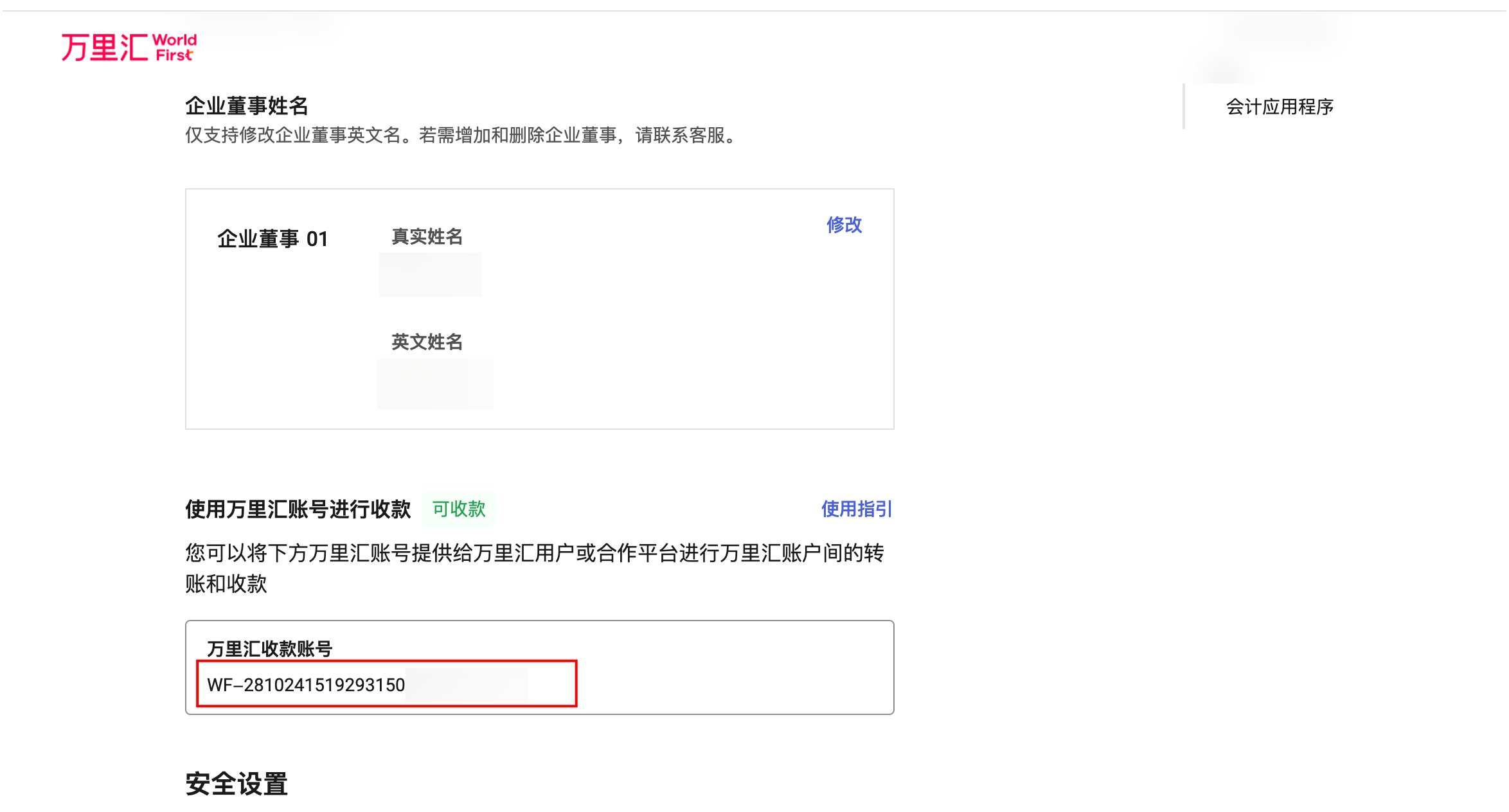
如选择结算至万里汇 B2B 账户,集成商需将万里汇收款账号及账号 ID 提供给万里汇技术支持进行配置。
操作方法:登录万里汇账户,点击右上角账户名,进入【我的账户】后下拉,即可查看个人的万里汇收款账号(以 WF 开头的账号)。
步骤三:获取集成信息
向万里汇技术支持获取下列信息:
- 万里汇线上环境公钥
- 万里汇线上环境域名
- client-id
注意:请确保获取的 client-id 与沙箱环境一致。
步骤四:完成接入并开始线上验收
联系万里汇技术支持以绑定线上付款账号,并支付 0.01 元 。待万里汇技术支持完成配置发布和签约流程,集成商即可开始线上验收。若双方验收无误则完成接入工作。